
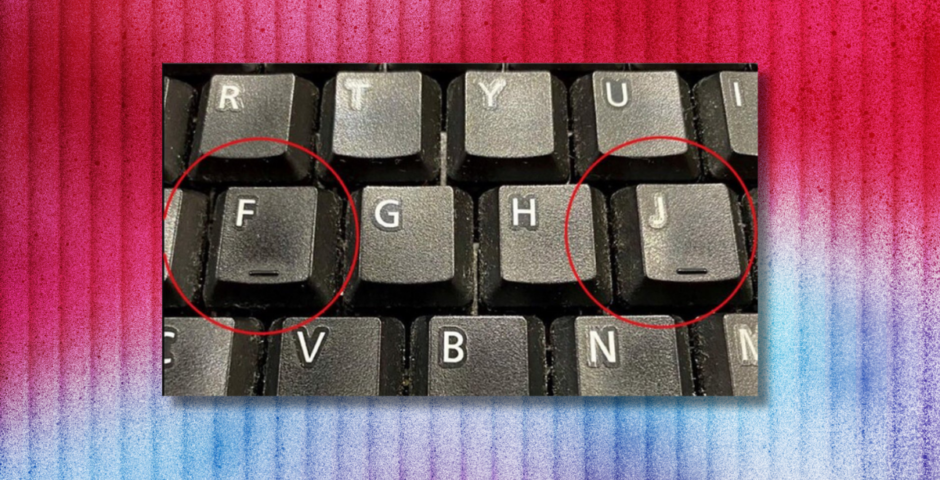
Everyone is only just working out what the lines on a keyboard are actually used for
I never knew this
It feels as though right now, every day on the internet is a lesson. I’ve just found out what the dots on a car windscreen are for, and now I’ve been told what the lines on a computer keyboard are for. It’s the practical things school never gave us.
A tweet has gone viral, asking what the lines found on the “F” and “J” keys are actually there for. The two keys have lifted bumps on them, and they actually serve a very helpful purpose. “I always wonder what these lines are for,” the tweet said.
Siempre me pregunto para qué son estas líneas pic.twitter.com/PiQXksZUEu
— itsD3lay🐧 (@itsD3lay) April 13, 2026
Well go on then, let’s find out.
So, what are the lines on a keyboard actually for?
The bumps are there for the autopilot, fast typers among us. The small raised bumps or lines on the “F” and “J” keys are tactile markers. They are designed to help you find what is called the “home row” (ASDF and JKL;) for proper finger positioning without needing to look down at the keys.


The F and J keys are where your index fingers rest naturally on a QWERTY keyboard. So, these markers allow you to locate the starting position for all ten fingers, enabling efficient typing without even glancing at the keys.
The lines on a keyboard can be helpful in lowlight situations, or if you don’t have a keyboard with any sort of back lighting. Or, if you’re copying from a document, or something else that might be taking your focus up on screen. You probably use them without even noticing!
Another day, another lesson.
For more like this, like The Tab on Facebook.


Latest

The Cornell case is horrific, but sexual violence on campus is not just an American issue

The allegations are a reminder that university sexual violence is everywhere

Where the iconic Lizzie McGuire cast are now 25 years on, from Adam Lamberg to Hallie Todd

Hilary Duff just did five tour dates in the UK

New Cornell fraternity group chat messages have surfaced as the criminal case is reopened
The messages are from a Snapchat group

‘In an amazing place’: Inside wholesome life Ariana Grande is now enjoying away from the public

When she will be back has also been shared

Lizzie Borden’s neighbour who was first at murder scene spoke in court about what she saw
She was there before the doctor

Monster skipped the real Lizzie Borden’s attempt to buy poison the day before the murders
It became trial evidence

TikTok loves Jean Philanthrope, but ‘French Lord Farquaad’s’ backstory is disappointing

Need his hair care routine
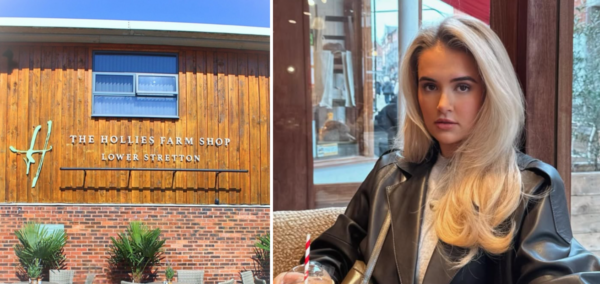
Manchester farm shop introduces filming restrictions after Molly-Mae made it influencer hotspot

The Hollies Farm Shop is restricting visitors during certain hours

Real accounts of what Lizzie Borden’s maid Bridget Sullivan was like as a person
She kept herself to herself

Police release pic of 30 uni students crammed into hot basement covered in food as two arrested
Some had ‘visible injuries’


Chris Watts ends prison relationship and calls off his jail wedding just weeks after it went public
His ‘wife’ had already been wearing a wedding ring

Real-life photos of Lizzie Borden’s parents show what they looked like over the years
Andrew and Abby look too young in Monster

Madonna’s family reportedly concerned about her health as they urge her to ‘slow down’ after VMAs
She’s keen to get ‘straight back to work’


Still not convinced about joining us? Here’s what ex-writers say about The King’s Tab

‘The Tab gives you the space to be your most authentic self’

Lizzie Borden’s doctor’s full court testimony, where he recalled finding Andrew and Abby dead
‘His face was hardly to be recognised by one who knew him’

A weapon in the Lizzie Borden case was never found, and it might not have even been an axe
Many different theories were investigated

Lizzie Borden wasn’t right for Monster, and the ‘female rage’ reason they chose her makes it worse
There was so much wrong with it

The full Celebrity Traitors 2026 episode schedule as day change is confirmed
Don’t get caught out when it returns this week