

The clock is ticking! Here’s exactly how to save your Snapchat memories before it’s too late
This process is a procrastinator’s worst nightmare

Cast your mind back to summer 2025. Festival season, Sabrina Carpenter’s Man’s Best Friend blasting from the radio, an unfortunate amount of KPop Demon Hunters everywhere. And for those who are definitely not still using Snapchat (…), the truly devastating news that Snapchat decided to cap storage of memories to 5GB – and delete the rest if you didn’t take action.
While this is maybe a sign that we should all grow up and delete Snapchat off our phones, people were pretty outraged. And now, time is running out to back up years of Snaps before they’re lost to the social media ether.
Your Snapchat Memories will be deleted if you exceed the 5GB limit
@izzy.eddies @snapchat pls sort urselves out you used to be for the real ones 😔 #snapchat #subscriptions
The app announced last year that, following a 12-month grace period, they would be capping the storage limit for its Memories feature. Even worse, any Memories beyond this 5GB cap will now be deleted in just a couple of months – bad news for anyone who had an unfortunate dog filter addiction in 2016 (you know who you are).
There is, of course, an obvious solution to this: A Snapchat+ subscription. But for those of us who are a) broke and b) refuse to deal with the embarrassment of having Snapchat+, there are some alternative methods to save those precious memories of you drunk at a house party 10 years ago.
Here’s how to save your Memories to your photos

via Unsplash
It is possible to just save your Memories straight to your camera roll, with the caveat that you can only do up to 100 Snaps at a time.
Tap the “Select” button at the top and then choose as many pics as necessary. From there, simply export to your camera roll. Easy peasy, but not so great if you have a decade’s worth of Memories.



There is a loophole in app settings
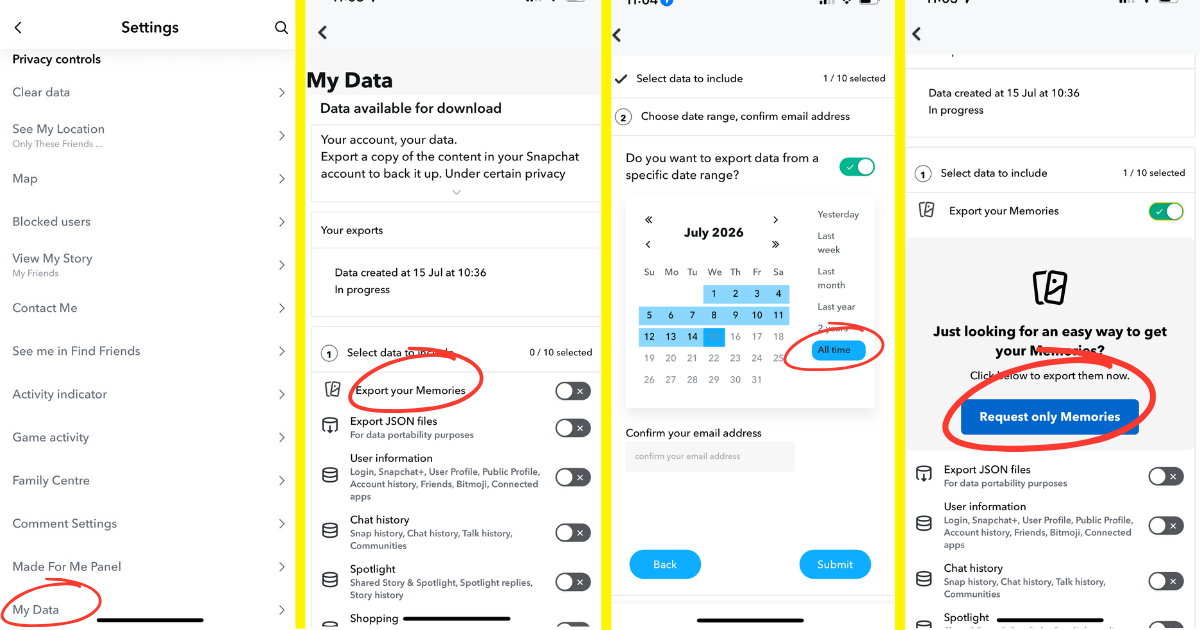
It’s actually pretty simple to export your memories in your Snapchat settings.
- Access your Snap settings by clicking on your profile, and then the cog wheel in the top right corner.
- Scroll down to the privacy control section, then click “My data”.
- From here, select the “Export your Memories” option.
- Once you click on the “Request only Memories” button, you’ll be asked to pop in your email and the date range you want to export.
It can take a few hours, if not days, to receive a zip file of your Memories to your email, but then you’re good to go. Only problem: Your Memories are now completely scrambled, with filters, text and overlays all split up. Not ideal.
Some people are using external apps like SnapEasy
@snap.easy Are you ok with losing your Snapchat memories? I’m not! #snapchat #snapchatmemories #export #help #snapmemories
A new app has gone pretty viral on TikTok offering to help people sort these messy zip files. For $9.99, SnapEasy will sort through your Memories, restoring them to their original condition. Spenny, yes, but certainly cheaper and less humbling than a Snapchat+ membership. Thank god our beautiful Memories won’t lose their “nrs x” captions!
For more like this, like The Tab on Facebook.
Featured image via Unsplash



Latest

A deep dive into Benita’s job outside of Love Is Blind, and her side hustle as a model

Benita also wrote a book

Love Is Blind’s Stew reveals what Jax DM’d him after calling off engagement and quitting the show

According to him, she was quick to reach back out

The age gaps of the Love Is Blind US season 11 couples who managed to lock it in
Michaella and Rob have the biggest age gap

Will Manchester’s Curry Mile replace its name as South Asian restaurants become scarce?

The end of the curry house era

Hairdrying knickers and £4 frappuccinos: Mistakes Lancaster first-years make at uni

Let’s class these mistakes as character building

Forget Gotham! London’s viral Batman is single-handedly restoring my faith in humanity

They say not all heroes wear capes, but this one does



University of York collaboration sets out new vision for online learning

The expansion will enable more learners from underrepresented backgrounds to engage with the uni

Celebrity Traitors has begun: Here’s how your Cardiff Uni course would behave in the game

Claudia would definitely pick the new YOLO ticket system as a Traitor

Burning buildings and thousands of arrests later: How the violent riots in France actually started
Students have suffered ‘war like’ injuries

The Traitors’ dramatic soundtrack is basically trolling us, and it’s completely intentional

The producers know those covers are a bit ridiculous

Cyber security threats target University of York staff and students
University of York has received a number of cyber security threats across the University community

Things that annoy me as a student in York

From ridiculous prices to aggressive geese, there’s always something to complain about.

Calling all Lancs students: Here are seven essential life hacks for surviving uni life

Because when you’re a student, you need all the help you can get

John shares statement to ‘clarify a couple of things’ after controversial chats in Love Is Blind pods
‘We both found it to be a wonderful, productive conversation’



Every social sec needs this: What your Wednesday night route says about you

This one’s for the mob of minions, chickens, lobsters, pink wig wearers, and sweaty boys in chinos

Joe Lycett opens up about his sweet friendship with Miranda Hart after Celebrity Traitors
They both got emotional

Comfortably chic: How to perfect your autumn wardrobe this semester

Attempting a chic autumn wardrobe on a maintenance loan is an extreme sport