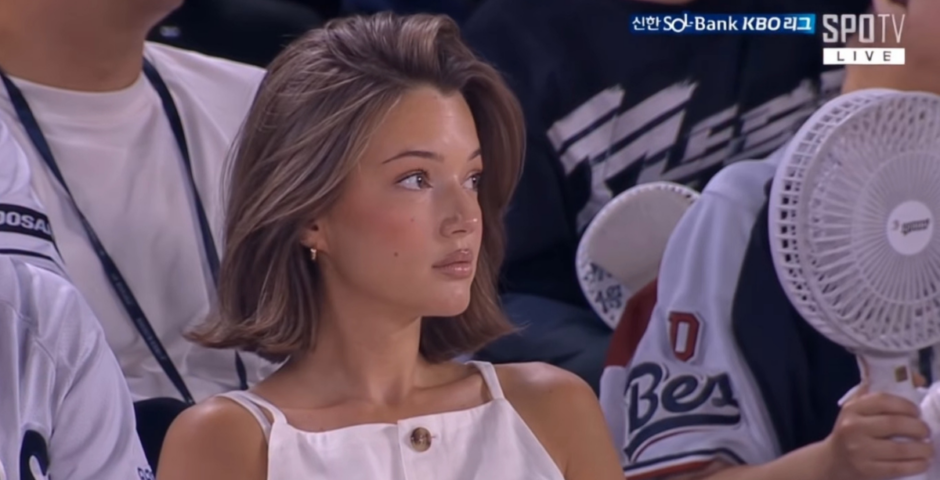
Everyone is, so here’s how to do the vibey AI sports cam trend you’re seeing everywhere
They look so good
Right now, there’s an AI trend taking over everything, and it makes you look as though you’ve been caught on a fan cam at a sports game. People are posting themselves in the crowd of basketball games, baseball games, and even at the F1. It looks so vibey.
The videos are going viral across Twitter, or X, Instagram and TikTok. And you can see why. They are a massive vibe. They take you from an average weekday, to being snapped in the crowd all casually, like this happens to you all the time. Apparently the trend started in Korea, and originally people were editing themselves into baseball games.
So, if you want to do it for yourself, here’s an easy step by step guide.
How do u like the trend ? pic.twitter.com/LdRnLYKIX1
— Armane Levalois (@armanevalois) May 11, 2026
How do you do the viral AI sports cam trend?
Want to get yourself in the stadium crowd looking all gorgy? It’s pretty easy. If you want a still photo of you at a basketball, baseball, or any other sports game, you can just ask trusty ChatGPT. You need a photo of yourself, and then give it a prompt something like this:
“Keep the uploaded person’s face exactly the same. Don’t make them look like an AI-generated beauty model. Generate the image as if they were naturally captured by a real KBO live sports broadcast camera in the audience. Realistic SPOTV/KBO broadcast screenshot vibe, candid stadium composition, nearby fans, drinks, cheering, handheld fan, natural seating arrangement. Slightly blur live-stream quality, compression noise, realistic skin texture, and imperfect lighting. Natural relaxed pose watching the game, not posing for the camera.
“Important: No face reshaping, no enlarged eyes, no jaw editing no overly smooth/glassy skin, no influencer or photoshoot vibe. Must feel like a real accidental broadcast capture of an ordinary spectator that went viral online.”
View this post on Instagram

Then, if you want to use this photo and make a video of you in the crowd of a stadium at a sports game, you need to use a different app after you’ve created the picture above.
People are using Kling AI, and then going to AI video. You upload your picture as the starting frame, then add a prompt such as this:
“Realistic sports broadcast video of a woman in a crowd, camera slowly zooms in as she is unaware of being on camera, she adjusts her hair or looks around casually watching the match, or sips a drink but all in a natural casual way.”
View this post on Instagram
Obviously, you can adjust your prompt to give the sort of movements you want, or adjust either prompts to tell the AI which type of sports game you want to be at.
Enjoy!
For more like this, like The Tab on Facebook.
Latest

Lizzie Borden’s doctor’s full court testimony, where he recalled finding Andrew and Abby dead

‘His face was hardly to be recognised by one who knew him’

A weapon in the Lizzie Borden case was never found, and it might not have even been an axe

Many different theories were investigated

Lizzie Borden wasn’t right for Monster, and the ‘female rage’ reason they chose her makes it worse
There was so much wrong with it

The full Celebrity Traitors 2026 episode schedule as day change is confirmed
Don’t get caught out when it returns this week
Ryan Murphy picks his favourite American Horror Story season, and it’s a controversial choice

It’s Sarah Paulson’s least favourite
Why the Love Island 2026 Islanders are suddenly posting ‘tart’ on all of Lorenzo’s posts
People think it’s a divide
Former Newcastle student raped in Freshers’ Week speaks out on potential dangers

“I didn’t know what had happened to me… I came home and was very confused”


The 20 easiest UK universities to get into, based on accepted students’ grades

University of Roehampton students have a D and two Cs on average
Here’s what joining these Cardiff Uni societies says about you

Things you need to know before joining a new society
A favourite from the Love Island 2026 cast is getting an All Stars return
A second chance is well deserved

Right, it’s time to lock in: Here are 10 things every Cardiff Uni final year needs to know

It’s never too late to make this year the best one yet
Charli XCX’s viral VMAs reaction wasn’t about Taylor Swift, so here’s what actually happened
They’ve been surrounded by rumours for years

University sued over alleged fraternity gang sexual assault and punishing accused with essays
The members discussed the attack over Snapchat
Here’s what TV show your Cardiff Uni accommodation would feature in

Everyone’s favourite show is finally back for another season

The major celebs who skipped the VMAs 2026 and why, despite having multiple nominations
Ariana Grande was nominated eight times but didn’t attend

All the advice freshers need to survive first year: Love, Cardiff Uni students who survived

From YOLO to locking in, here’s all you need