
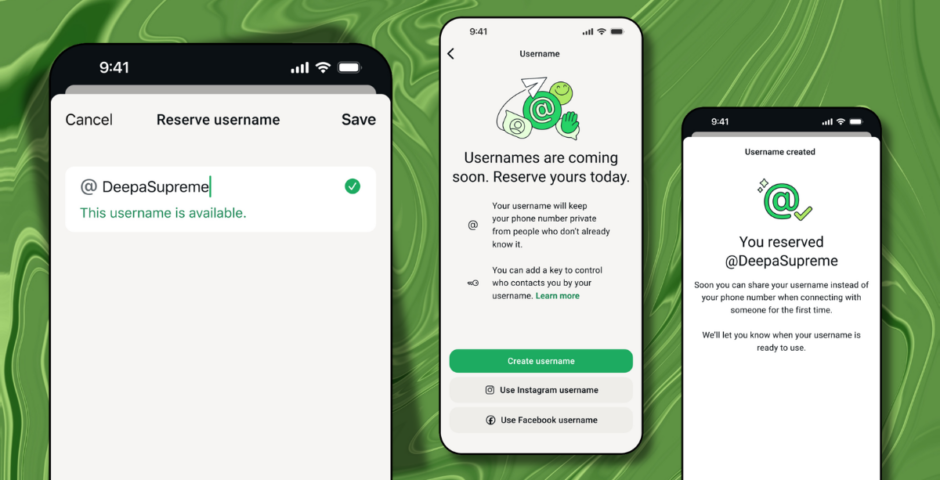
This is not a drill: How to reserve your WhatsApp username as Meta rolls out major changes
Fighting for my username like it’s the last lifeboat on the Titanic
Though you’ve long had to offer your phone number to use WhatsApp, the Meta-owned social network is set to roll out a new username feature.
“When someone new walks into your life — a classmate, a neighbour, someone you meet at an event — sharing a phone number can feel like a big step. That’s because a phone number is personal and it’s tied to so many parts of your life. Sometimes you just want to chat without handing over your digits,” WhatsApp said in a press release.
“This is also true for group conversations. You want to join the parent chat for the soccer team but you’re not ready to give your phone number to people you’ve never met.”
To combat this, it’s added a username feature that lets users keep their phone numbers private. Say goodbye to your sneaky link pestering you!
View this post on Instagram
“Starting this week, you can reserve a username to use later this year when we launch this feature. With over three billion people on WhatsApp a lot of names overlap, which is why we’re opening reservations early so everyone has the opportunity to select the username that matters to them,” WhatsApp added.
Though I’m sure ideas are already spinning, there’s a handy username generator in case you’re stumped.
Here’s how to reserve your WhatsApp username
Setting up your username is remarkably easy, but it’s worth noting that there’s an “option to claim” for people to use. Essentially, it allows people, businesses, or creators to claim their existing handles on Instagram and Facebook.



WhatsApp explained: “Usernames are our latest step to make WhatsApp even more private. There’s no directory to browse and no suggestions – people will need to know your exact username to contact you for the first time. To help control who can reach you on WhatsApp with your username, we’ve built an optional username key that others will need to know to message you.
People complaining about the What’s app Username is just hilarious.
Nobody is forcing you to create a username.
You can continue with your number or create a username that is different from what people know you with.— Leo Dasilva (@SirLeoBDasilva) June 29, 2026
“Once we launch usernames, when you message a person or business for the first time they will no longer see your phone number, if you enabled your username.”
To reserve your username before the new WhatsApp feature rolls out, head on over to settings, account, and then username.
If the option isn’t available yet, just be patient; the app is in the process of kicking it off.
For more like this – like The Tab on Facebook.
Featured image credit:


Latest

Lizzie Borden wasn’t right for Monster, and the ‘female rage’ reason they chose her makes it worse

There was so much wrong with it

The full Celebrity Traitors 2026 episode schedule as day change is confirmed
Don’t get caught out when it returns this week

Ryan Murphy picks his favourite American Horror Story season, and it’s a controversial choice

It’s Sarah Paulson’s least favourite

Why the Love Island 2026 Islanders are suddenly posting ‘tart’ on all of Lorenzo’s posts

People think it’s a divide

Former Newcastle student raped in Freshers’ Week speaks out on potential dangers

“I didn’t know what had happened to me… I came home and was very confused”


The 20 easiest UK universities to get into, based on accepted students’ grades

University of Roehampton students have a D and two Cs on average


Here’s what joining these Cardiff Uni societies says about you

Things you need to know before joining a new society

A favourite from the Love Island 2026 cast is getting an All Stars return
A second chance is well deserved

Right, it’s time to lock in: Here are 10 things every Cardiff Uni final year needs to know

It’s never too late to make this year the best one yet

Charli XCX’s viral VMAs reaction wasn’t about Taylor Swift, so here’s what actually happened
They’ve been surrounded by rumours for years

University sued over alleged fraternity gang sexual assault and punishing accused with essays
The members discussed the attack over Snapchat

Here’s what TV show your Cardiff Uni accommodation would feature in

Everyone’s favourite show is finally back for another season

The major celebs who skipped the VMAs 2026 and why, despite having multiple nominations
Ariana Grande was nominated eight times but didn’t attend

All the advice freshers need to survive first year: Love, Cardiff Uni students who survived

From YOLO to locking in, here’s all you need



The ultimate Uni of York guide: New year, new advice

Here’s everything you need to know before the academic year at the University of York

The real ‘most foul’ death of Bertha Manchester, who died six days before Lizzie Borden’s trial

Did ChatGPT write Monster or something?