
Here’s how to do that AI Christmas photo trend with the candy canes, using ChatGPT
It’s everywhere right now
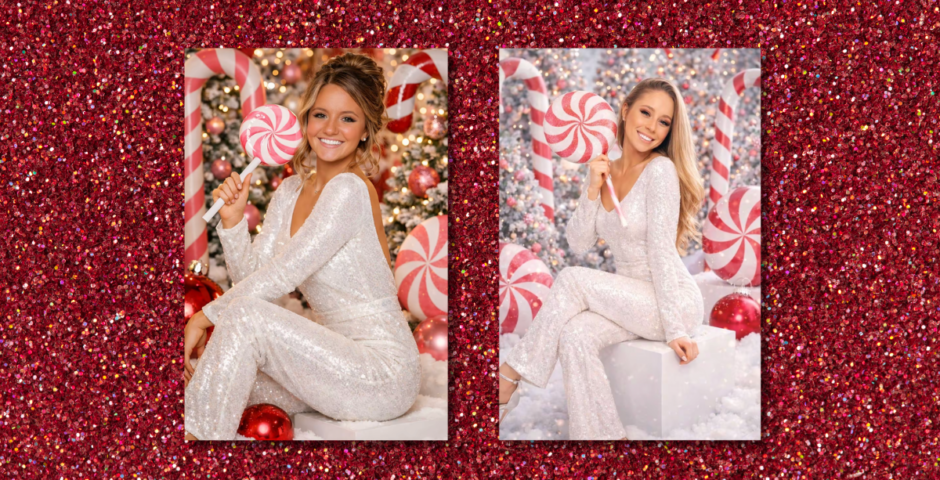
A new AI Christmas photo trend has emerged, and this one makes it look like you’ve done a sparkly festive photoshoot, surrounded by candy canes, using ChatGPT.
Like the Ghostface trend that has everyone obsessed over Halloween, it uses AI to turn you into a Christmassy version of yourself wearing an outfit covered in sequins. Around you are loads of candy canes, lollipops, Christmas trees, snow, fairy lights and baubles.
As always, the pictures are super realistic, making it look like you’ve actually gone and done a professional holiday photoshoot, and it’s so easy to do. If you want to join in, here’s a step-by-step guide explaining exactly how to do it – and the prompt you need.
@awesomelikeangel Let’s see yours! Leave them in the comments!! 🎄❤️ Prompt below: Add your photo and then put: Create an ultra-realistic 8K Christmas portrait using a 55mm lens with bright, playful holiday lighting. The woman is in a whimsical candy-cane themed photoshoot, surrounded by pink giant peppermint decorations, snowy ground, festive trees, and oversized ornaments. Use her real facial features exactly as they are — do NOT change or alter her face in any way. Her makeup is festive glam — winged liner, warm eyeshadow, rosy cheeks, and a bold holiday soft pink lips. She wears a sparkly white long-sleeve pants jumpsuit , fitted and shimmering with sequins. The back of the jumpsuit has a scoop-back cut, adding keeping the holiday sparkle. She is sitting on a white cube block, posing with one leg lifted and crossed, similar to the reference image. Her expression is playful and confident, smiling warmly toward the camera. In her hand, she holds a giant pink-and-white peppermint lollipop prop, resting it over her shoulder in a fun, candy-land pose. Around her is a fully decorated Christmas set: • Snowy ground with fluffy artificial snow • Christmas trees dusted with frost, decorated with pink ornaments and string lights • Oversized and canes framing whimsical beside her • A large shiny red Christmas ornament near her feet Lighting should be bright, clean, and festive, capturing the glimmer of the sequins and the pink candy-themed props. The colors are vibrant reds, whites, and silvers, giving a magical North Pole holiday studio vibe. #aiphoto #christmaspictures #chatgpt #ai #christmasfiltereffect



Here’s how to do the AI Christmas photo candy cane trend with ChatGPT
- Open the ChatGPT website or app
- Click ‘Attach’ and upload a photo of yourself
- In the box underneath, copy and paste this prompt: Create an ultra-realistic 8K Christmas portrait using a 55mm lens with bright, playful holiday lighting. The woman is in a whimsical candy-cane-themed photoshoot, surrounded by pink giant peppermint decorations, snowy ground, festive trees, and oversized ornaments. Use her real facial features exactly as they are — do NOT change or alter her face in any way. Her makeup is festive glam — winged liner, warm eyeshadow, rosy cheeks, and a bold holiday soft pink lips. She wears a sparkly white long-sleeve pants jumpsuit , fitted and shimmering with sequins. The back of the jumpsuit has a scoop-back cut, keeping the holiday sparkle. She is sitting on a white cube block, posing with one leg lifted and crossed, similar to the reference image. Her expression is playful and confident, smiling warmly toward the camera. In her hand, she holds a giant pink-and-white peppermint lollipop prop, resting it over her shoulder in a fun, candy-land pose. Around her is a fully decorated Christmas set: Snowy ground with fluffy artificial snow, Christmas trees dusted with frost, decorated with pink ornaments and string lights, Oversized and canes framing whimsical beside her, A large shiny red Christmas ornament near her feet. Lighting should be bright, clean, and festive, capturing the glimmer of the sequins and the pink candy-themed props. The colours are vibrant reds, whites, and silvers, giving a magical North Pole holiday studio vibe.
- Click the black ‘Send’ arrow and wait for ChatGpt to create your photo
Now all you have to do it save the pictures and upload them to TikTok. And don’t forget to add the song Santa Baby in the background!
For more like this – like The Tab on Facebook.
Featured image by: TikTok
Latest

Channelling your broke uni student lifestyle

Not everything needs to be accompanied by a £5 iced latte, here’s how to be more mindful
The York Tab is recruiting new writers and we want YOU!

Open meeting Monday 28th September, 6pm in SLB/004!
Here’s who the uncle in Monster: The Lizzie Borden Story was, and what Netflix makes up

John Morse really did stay in the Bordens’ house

Er, Lizzie Borden’s meeting with the actor Nance O’Neil was nothing like Netflix’s Monster
Their paths didn’t actually cross for another 14 years
With 600 alleged killings, this minor character in Lizzie Borden should have been the Monster

HUGE missed opportunity

Did Andrew Borden have a stutter? Charlie Hunnam breaks down accent and voice in Netflix show

The actor has fully explained it

Elektrik Warehouse responds to alleged ‘crowd crush’ concerns at Shoshi event

‘It was just lucky nothing insanely bad happened’

Uni of Edinburgh confirms 25 days of strike action over five weeks, affecting Welcome Week

Am email sent to Edinburgh University students read ‘staff are not obliged to tell us if they plan to take part, which means we cannot tell you who is or is not’

There’s a really smart way to hack your Spotify Wrapped results for 2026 – before it’s too late
The cut-off for data tracking is very soon!

Meet OnlyFans’ gay ‘golden boy’ Ashton, and the thirsty clip that’s earned him 33 MILLION views
The clip is seconds long, but it leaves an impression

Real-life significance of Lizzie Borden’s period and if she suffered from menstrual problems

It’s a big part of Monster: The Lizzie Borden Story

My straight boyfriend does gay OnlyFans, but I’m scared he’ll leave over one thing he keeps saying
He replied, ‘It’s always been my rule since day one: If the cameras are on, it’s not gay’


This viral list ‘years in the making’ claims these 21 things are FORBIDDEN once you turn 20
If you do any of these you should reevaluate your life, apparently

Woman whose Love Is Blind partner tried to kill her says he still contacts her from prison
He was sentenced to 15 years

Why Ed Sheeran is ‘furious’ as details emerge about the 40-minute call that got Macklemore fired
‘He’s been thrown under a bus’

Miley Cyrus reveals her emotional final conversation with Dolly Parton before she died
‘That’s what made us so perfect’

Nick Mohammed to appear in Traitors West End production

The influence of Durham’s student theatre scene

Three universities rank higher than Oxbridge in The Times’s league tables for 2027
The new top university in the UK isn’t part of the Russell Group

Inside the vibey life of Lizzie Borden actress Ella Beatty, who has two very famous parents
I’m sorry, dating rumours with Hugh Jackman?