
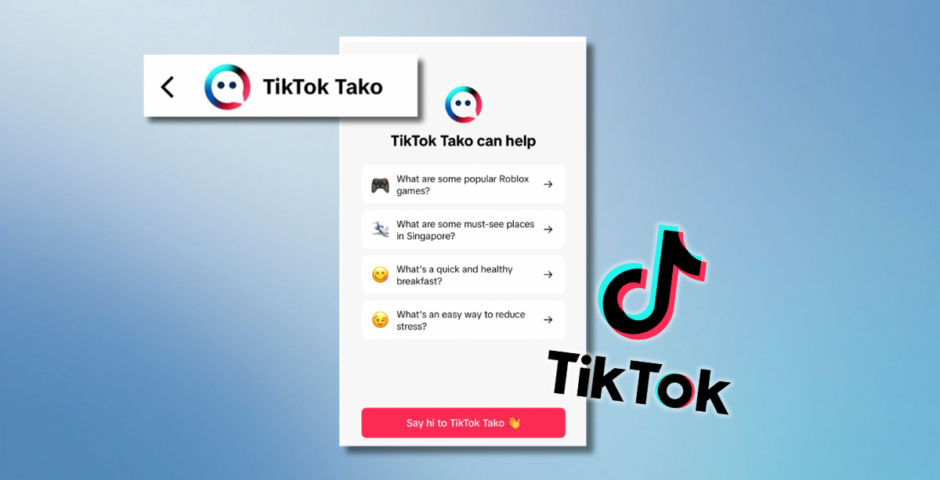
Right, here’s how to turn off TikTok’s annoying new AI chatbot called Tako
Not another one

TikTok is rolling out its new AI chatbot Tako to even more people across the world in 2026, and everyone’s wondering how to turn the annoying feature off.
The app started testing Tako all the way back in 2023, an AI chatbot just like ChatGPT that’s built into the app and appears on the For You Page on the right-hand side of videos, above the person’s profile picture.
“Hey! I’m TikTok Tako. Feel free to ask me anything and I’ll do my best to help you find what you’re looking for,” the AI bot says when you first open it. You can ask it practically anthing you want, and Tako will provide a conversational answer.
Think this is new: TikTok has expanded its AI chatbot, Tako, to… everyone?
Or at least it’s now prominently displayed on EVERY video I’m seeing.
Click it and it gives you a bunch of prompts related to the video that you can share with Tako. pic.twitter.com/8GgDYrJzDu
— Chris Harihar (@ChrisHarihar) February 4, 2026
But with ChatGPT, Google Gemini and Twitter’s Grok, there’s literally no need for another AI chatbot on the internet. Thankfully, there’s a quick way to stop it from annoying you, so here’s exactly how to turn it off.
Here’s how to turn off TikTok’s AI chatbot Tako
You can’t disable the feature completely, but you can stop TikTok Tako from sending you annoying pop-ups. The button will still appear on the right-hand side of videos, but you won’t be constantly nagged to use it.
wtf is tiktok tako and why is ai slop being forced into tiktok
— peace (@peacefulthings0) February 4, 2026


To turn TikTok Tako off, follow these steps:
- Open TikTok Tako
- Click the three dots in the top right-hand corner to bring up Tako’s settings
- Turn on “Stop unprompted messages”
People are also recommending to turn off a section of the main TikTok settings called “Display Object Tags”. To do this, go to your profile and click on the three lines in the top-right hand corner. Then, go to Content and Display > Playback > Turn off “Display Object Tags”.
no i do not want tiktok tako LEAVE ME ALONE
— lavanni (@iamlavanni) February 5, 2026
Now, TikTok Tako won’t send you any annoying push notifications related to its AI chatbot, and you can basically just pretend it doesn’t exist. Thank god. Normal TikTok order can resume!
For more like this, like The Tab on Facebook.
Featured image credit: TikTok

Latest

UYRUFC achieve a ground breaking Ladies Day

The club successfully raised over £5,000 for Pink Ribbon Foundation, breaking UYRUFC club records

Altra Yorkshire Marathon sees record number turnout

Thousands of runners gathered on 18 October to set off from University of York campus for the marathon

The Celebrity Traitors has ‘off days’, but rules dictate what the cast can do off-camera

Joe Lycett painted Rob Beckett
How to have the spookiest Halloween in Cardiff without breaking the bank

If your bank balance isn’t keeping you up all night, these Halloween plans might

Selena Gomez to Doja Cat: The celebrities who’ve opened up about their vaping habits

Many are trying to quit

Revs or MASH? Cambridge students have finally spoken

Here’s how students actually feel about Cindies’ MASH takeover

How to spend 24 hours in Manchester like you’re in a Gilmore Girls episode

From crunchy leaf walks to here’s your very own guide to romanticise this season

Cambridge on a plate: Unique independent food spots around the city
I visited a range of proudly independent Cambridge food spots to give you my verdict

James Acaster reveals Celebrity Traitors contestants hear The Hanging Tree over and over again

It’s left people ‘traumatised’
This is exactly how you would win The Traitors, based on your Leeds degree

Now reveal yourself: Aare you a Traitor or Faithful?
The best Halloween costumes you can make with clothes you already have

Let’s beat the last-minute panic together
Human remains removed from Glasgow museums due to controversial ‘consent’ issues

Both the Kelvingrove Art Gallery and the Hunterian Museum have removed parts of their Egyptian display due to lacking ‘consent’ from the deceased

Here’s which type of player each Lancaster college would be on The Traitors

At Lancaster, anyone could be a traitor
The Love Is Blind UK S3 couple who didn’t get married on the show just split via text message
Sammy says she was about to move in with Jonathan

Two obstacles stand in the way of a second execution attempt on Christa Pike
What will happen next remains unclear

Sharon Rooney’s latest Celebrity Traitors decisions could make her an easy target for the Traitors
She’s made some questionable moves

Here’s the spookiest places in Newcastle you should visit

A 9am lecture after a night out is scary enough, but what if you’re looking for more?
Roundtable moment exposed who the Traitors are to the whole group and nobody clocked
Somebody needs to remember this

Joanne explains why she snapped at Miranda during that awkward Celebrity Traitors roundtable
‘Gaslighting’ got to her

Your childhood bedroom is now a storage cupboard- returning home for reading week

Reflections on returning to civilisation