Here’s exactly how to do the viral TikTok eye trend that’s everywhere right now
It’s not just a simple filter

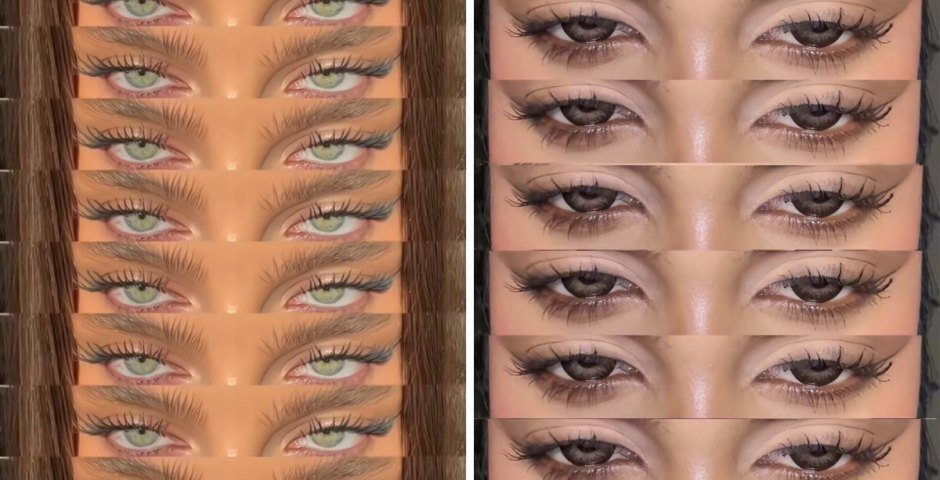
The viral eye trend has been taking over TikTok for the past month, so here’s a detailed tutorial on exactly how to do it without a glitchy TikTok filter.
Another day, another TikTok trend, and this time it’s about eyes. People are showing off their eye colour and shape in close-up, intimate videos, using an audio clip from the song PARIS16 by Kana. There are millions of videos under the audio participating in this trend, and some of the most popular videos also have millions of likes.
@romaarif21 The eyes #romaarif24 #trend #explore #eyes #trending
But it looks like everyone’s using a different method to make these videos, and no one is giving a clear tutorial. But don’t worry, we’ve got you!
Here’s how to make your own vibey eye trend video on TikTok without a filter
Step One: Take a close-up video of yourself focusing on your lips, nose, then eyes. Do this on a normal camera, and make sure you linger on your eyes for the longest part of the video. All the most viral videos have really good lighting, so film next to a window or a lamp.
Step Two: Open CapCut – if you don’t already have it downloaded, get it for free on the App Store. Start a new project on there and set the canvas to 9:16. Add your video and mess around with it until you get the perfect framing.
@raminamuradova
Step Three: Then, make several copies of your original video. Most videos of the eye trend have eight copies, but you can do as many as you think suits your video. After you’ve got all your copies, use the mask tool to shape everything into a rectangle.
Step Four: Put them all together and make sure there aren’t any gaps. Set it to PARIS16 by Kana, and you’re all set!
For more, like The Tab on Facebook.
Featured image via TikTok
Latest
The ultimate Uni of York guide: New year, new advice
Here’s everything you need to know before the academic year at the University of York
The real ‘most foul’ death of Bertha Manchester, who died six days before Lizzie Borden’s trial

Did ChatGPT write Monster or something?
I spent a night at the Lizzie Borden house, and the experience will stay with me forever

‘You can definitely feel a heaviness there’





The Notts bucket list: Everything you should do before you graduate

Whether you’re a fresher or a final year, here’s everything you need to do before you leave Nottingham

The best Too Good To Go surprise bags that are a walk away from campus

Refer to this when you finally don’t crave pesto pasta for the 10th night on the run

The Tab Tries: GU Film-making society film premiere

A night at the movies and some BTS on the society
No, the real Andrew and Abby’s marriage wasn’t much like Monster: The Lizzie Borden Story

Lizzie Borden actually testified that their marriage was happy
Monster missed out some key details about Lizzie Borden, including her community work

She taught Sunday School and volunteered at the local hospital
The confusing release dates for the next three episodes of American Horror Story season 13
Need them right this moment
Lizzie Borden left $32k to animal charity in her will, and the rest of her money was divided
Her best friend got $5k
Monster: The Lizzie Borden Story’s creator explains the meaning behind that wild ending

It was surprisingly emotional
Aileen Wuornos and Lizzie Borden’s made-up connection explained after Netflix’s Monster
Her character seems so random
The Sense and Sensibility characters are very different ages in the book to the film’s cast
Frank Dillane is a decade older than Willoughby is in the book
Oxford Brookes among 13 universities to drop 20+ places in The Times’s new rankings
Bath Spa University fell 41 positions in the league table
Rafe Coleman Chadwick becomes the youngest person to run the UK AND complete the three peaks

Rafe completed the 3 Peaks Challenge in 22 hours and 40 minutes.
The reason Netflix’s Lizzie Borden series has jarring modern music, according to the showrunner
Not a single song is from the 1800s
Lizzie Borden was acquitted, so who do people think actually killed her parents?
There are many other suspects